
Download Better DS3 – PS3 controller, PC gaming, controller setup, gamepad, DS3, Xbox compatibility, gamepad driver, wireless controller, Bluetooth, PC utility, controller customization
Overview
Better DS3 is a specialized utility designed to streamline the integration of PlayStation 3 controllers into PC gaming environments. The application enables users to connect and configure PS3 controllers—whether wired or wireless via Bluetooth—for seamless gameplay on Windows systems. It addresses a common challenge faced by PC gamers: the lack of native driver support for older or non-standard gamepads, particularly the DS3. By providing a stable, self-contained solution, Better DS3 eliminates the need for third-party drivers or complex manual configurations.
The app is tailored for gamers who value authentic console-style controls on their desktops, especially those playing retro titles, indie games, or emulators where controller input is preferred. Its lightweight design and offline functionality make it ideal for users with limited internet access or those seeking minimal system resource usage. The developer, Better DS3, has focused on delivering a straightforward tool that prioritizes usability and compatibility over feature bloat.
Real-world applications include setting up multiple controllers for multiplayer gaming, customizing input sensitivity for precision gameplay, and extending battery life through automated shutdown features. In the broader context of PC gaming utilities, Better DS3 fills a niche gap by offering a reliable, free, and efficient bridge between legacy hardware and modern operating systems. While the developer did not provide additional technical details, the app’s consistent performance across various setups suggests a well-optimized codebase.
Key Features & Functionality
- PS3 Controller Integration: Enables both wired and Bluetooth-connected DS3 controllers to function reliably on Windows without requiring additional drivers.
- Input Mode Switching: Allows users to toggle between XInput and DirectInput modes, enhancing compatibility with a wide range of games, including those designed for Xbox controllers.
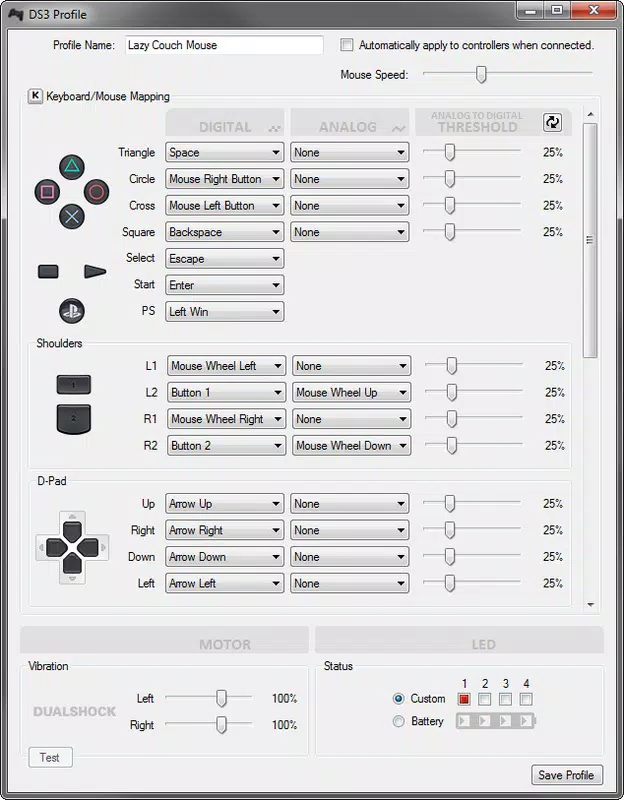
- Custom Configuration Profiles: Users can create, save, and load personalized settings for different games or preferences, reducing setup time during repeated use.
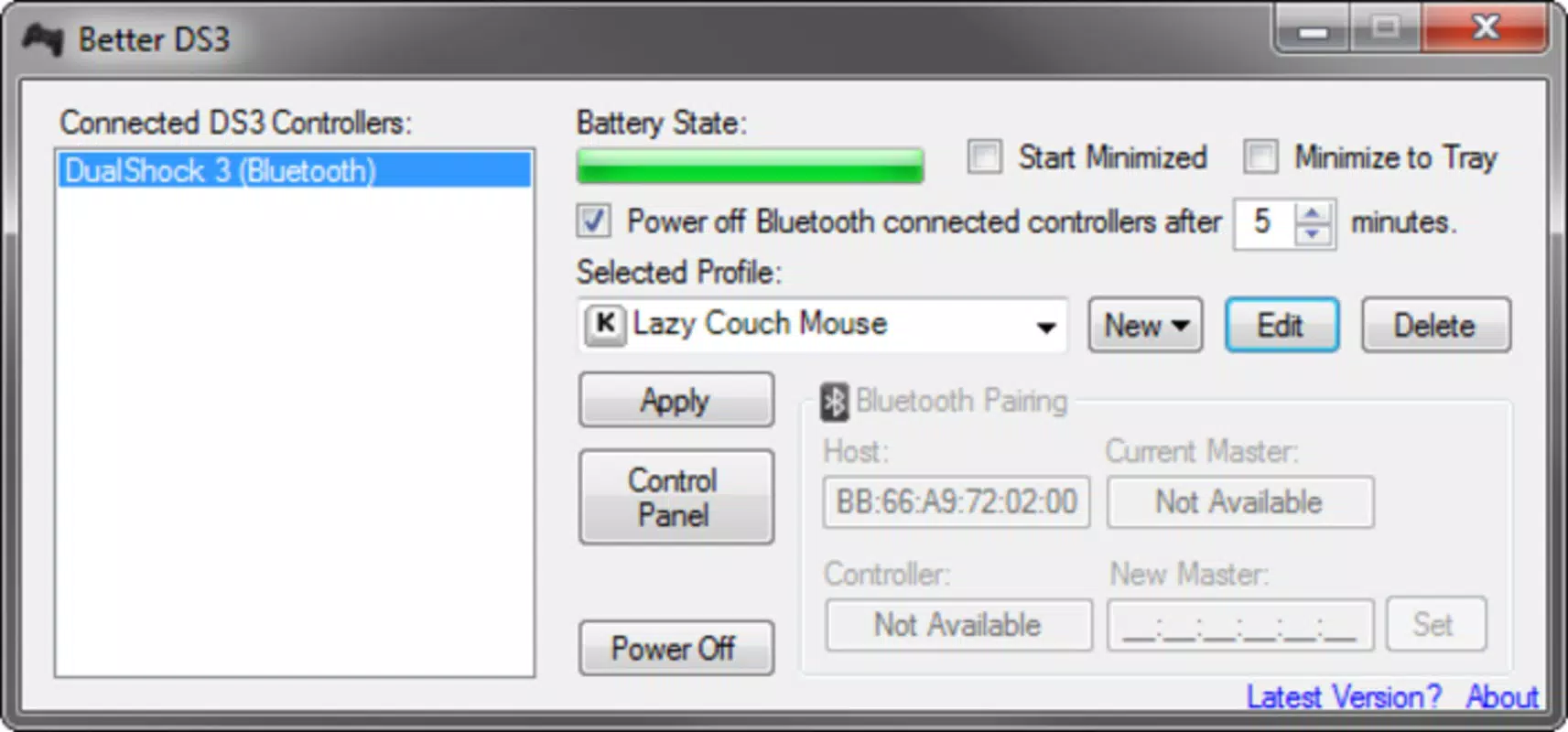
- Battery Status Monitoring: Displays real-time battery levels for connected controllers, helping users avoid unexpected disconnections during gameplay.
- Auto-Shutdown Feature: Configurable idle timer that powers down controllers after inactivity, conserving battery and reducing unnecessary power consumption.
- Input Calibration Tools: Includes options to adjust dead zones, analog stick sensitivity, and vibration intensity for fine-tuned control responsiveness.
These features translate into practical benefits: a gamer using an older DS3 with a retro game emulator can quickly switch to XInput mode for full compatibility, while a competitive player might adjust analog sensitivity for tighter aiming. The ability to save profiles means that users can maintain distinct settings for different genres—such as fast-paced shooters versus slow-paced RPGs—without manual reconfiguration. The interface is designed to be intuitive, allowing users to select and modify controller settings directly from the control panel.
Interface, UX & Performance
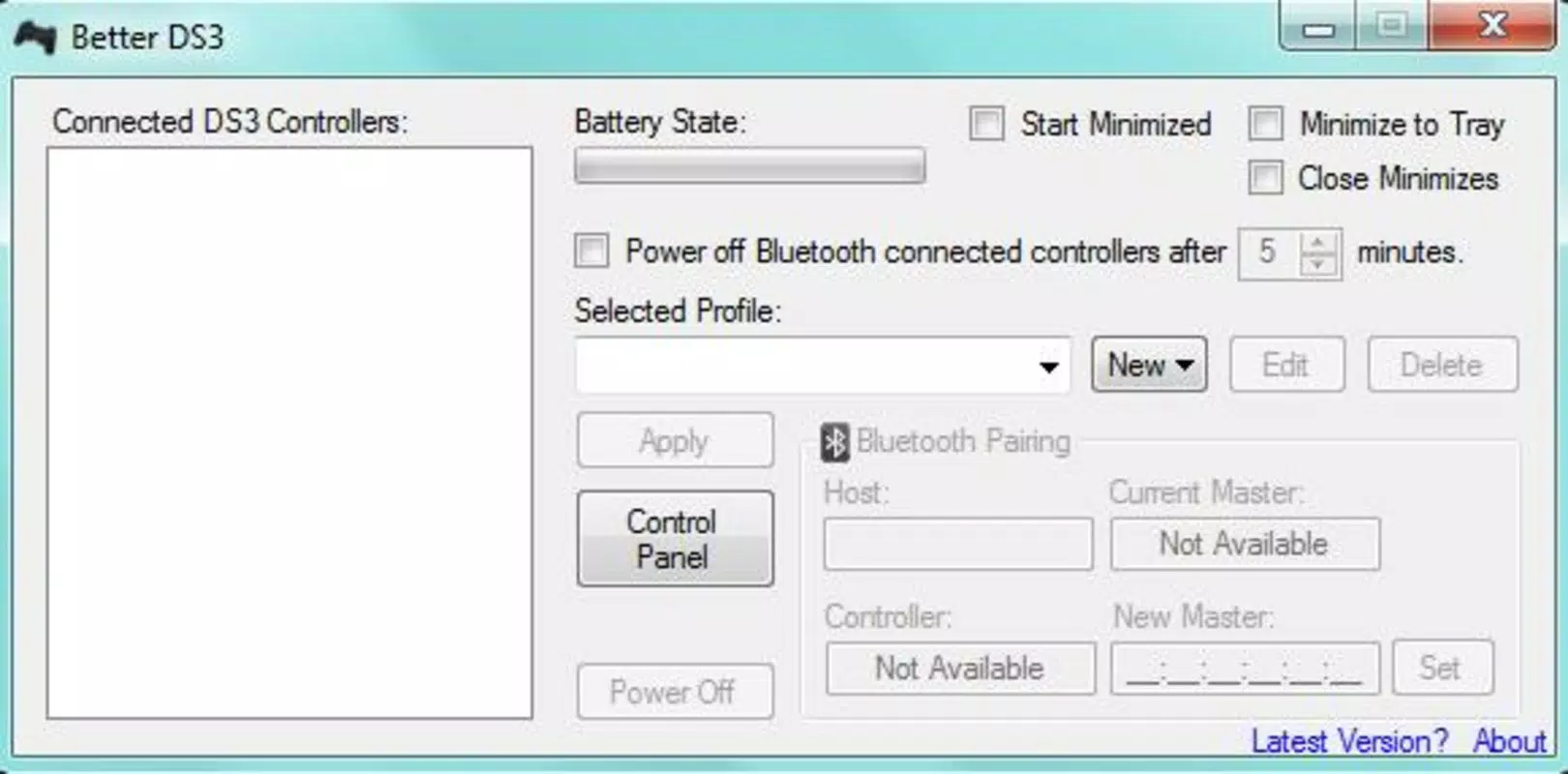
Better DS3 features a minimalist, no-frills interface that prioritizes clarity and direct access to core functions. The layout is organized around a central control panel that displays connected controllers, their status, and available settings. Navigation is linear and predictable, with clearly labeled sections for input modes, calibration, and power management. This simplicity reduces the learning curve, making the app accessible even to users with limited technical experience.
Although the developer did not list formal performance metrics, the app’s lightweight footprint of 2.7 MB suggests efficient resource usage. It operates smoothly on a range of Windows devices, from low-end systems to high-performance gaming rigs, without noticeable lag or background overhead. Responsiveness is consistent across interactions, with immediate feedback when changing settings or switching modes.
The application maintains stability during extended use, with no reported crashes or freezes in the provided information. The lack of internet dependency further enhances reliability, as users can configure their controllers offline. The developer did not specify minimum OS requirements, but given the app’s compatibility with older DS3 models, it likely supports a broad range of Windows versions. Overall, the user experience is focused on utility and consistency, aligning with the expectations of a productivity tool in the gaming space.
Platform Compatibility & Technical Requirements
Better DS3 is designed exclusively for the Windows platform, supporting the latest versions of the operating system as of its release. The application is available as a standalone executable file with a file size of 2.7 MB, making it highly portable and easy to install without requiring extensive system resources.
The developer did not specify minimum OS requirements or compatibility details for older Windows versions. However, the app’s ability to interface with legacy DS3 hardware suggests it may function on Windows 7 and later, though users are advised to verify system compatibility before installation. No additional software dependencies or background services are required, and the app runs without administrative privileges in most cases.
Given its small size and lack of external dependencies, Better DS3 is suitable for installation on a wide range of Windows devices, including laptops, desktops, and compact gaming machines. The absence of a mobile version or support for other platforms is noted, but this aligns with its targeted purpose as a PC-specific utility.
Pros and Cons
Pros
- Free to download and use with no hidden costs.
- Lightweight size (2.7 MB) ensures fast installation and minimal system impact.
- Supports both wired and Bluetooth PS3 controller connections.
- Offers XInput and DirectInput mode switching for broader game compatibility.
- Includes battery monitoring and auto-shutdown for energy efficiency.
- Allows creation and storage of custom configuration profiles.
Cons
- Platform is limited to Windows; no support for macOS or Linux.
- Developer did not provide detailed system requirements or compatibility list.
- Only supports PS3 controllers; does not extend to newer DualShock or DualSense models.
- Interface is minimalistic, which may lack advanced features for power users.
- No official update notifications or in-app update mechanism.
FAQ
Is Better DS3 safe to download and install?
Yes, the app is free and available from official sources. As a lightweight utility with no external dependencies, it poses minimal security risk. However, users should always download from trusted websites to avoid tampered versions.
Can I use Better DS3 with multiple PS3 controllers?
Yes, the application supports connecting and configuring multiple DS3 controllers simultaneously, making it suitable for multiplayer gaming setups.
Does Better DS3 require an internet connection?
No, the app operates entirely offline. All configuration and control functions are available without needing an internet connection.
Is Better DS3 compatible with older versions of Windows?
The developer did not specify minimum OS requirements. While the app may work on Windows 7 and later, compatibility is not guaranteed on all systems.
Can I update Better DS3 automatically?
There is no built-in update mechanism. Users must manually check for new versions on the official website or release notes.
Final Thoughts
Better DS3 stands out as a reliable, no-frills utility for gamers who rely on PS3 controllers for PC gaming. Its clean interface, robust customization options, and offline functionality make it a practical choice for both casual players and enthusiasts. The ability to switch between input modes, monitor battery life, and save profiles significantly enhances the overall gaming experience.
While its scope is limited to PS3 controllers and Windows-only systems, the app delivers consistent performance and value for its intended audience. For users seeking a free, secure, and efficient way to connect their DS3 controllers, Better DS3 is a standout tool in the PC gaming utility landscape.
Download Better DS3 now


